
Before diving into how BLAS is written to be fast, it’s essential to understand memory. Specifically, how data is stored in memory and how it is fed to the processor, which performs the computations. All BLAS does is optimize these two operations for a specific computer architecture. CORAL, for instance, targets AArch64 architectures.
Future posts on BLAS will refer back to concepts explained here.
The content in this post is heavily taken from What Every Programmer Should Know About Memory by Ulrich Drepper. It’s phenomenal. Unless otherwise linked, all numerical values come from this paper.
Heuristics Ahead
Cycle counts, sizes, and policies shown here are approximate heuristics.
They vary by CPU architecture and memory configuration.
Memory#
Memory is a physical structure that stores digital information as electrical states. A single bit of memory represents either a logical 0 or 1 by maintaining distinct, measurable voltages inside microscopic circuits. These circuits exist in layers of memory hierarchy, a set of memory storage levels that trade off speed, capacity, and energy.
A fast BLAS aims to keep its working data in the fastest available level of the hierarchy.
Definition
A clock cycle is one complete oscillation of a processor’s clock signal. It’s the periodic rise and fall of voltage that synchronizes every operation in the CPU – the smallest unit of computational time.
At the lowest level are registers inside the CPU itself. Accessing data from registers takes $\leq 1$ cycle. Above registers are caches, which exist in three sub-levels. Accessing cached data takes between $\sim$3-60 cycles depending on which sub-level is accessed. Beyond caches lies the main memory. Accessing data from main memory takes $\sim$200-400 cycles. Together these levels form the hierarchy that moves data from storage to the processor.
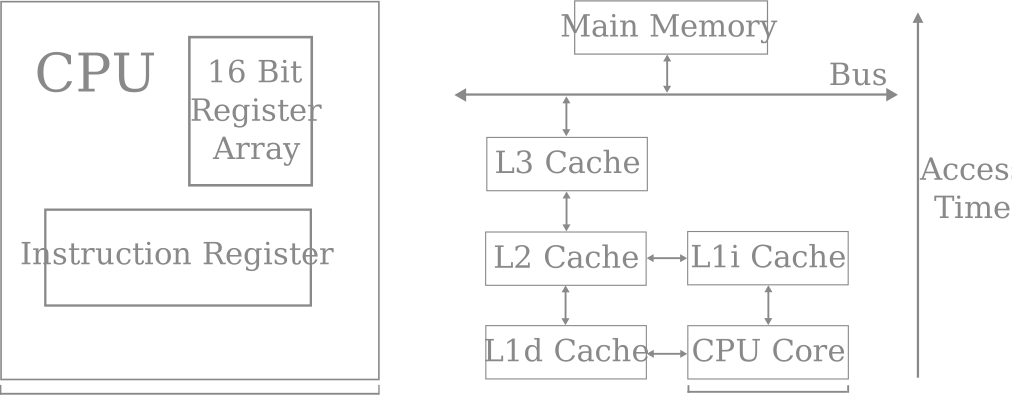
Naturally, the lower level storages are faster to read and write data to. However, they are much smaller in size, trading capacity for speed. This will be critical when discussing packing strategies for BLAS.
Static and Dynamic RAM#
All working memory in a computer is built on one of two forms of Random Access Memory (RAM): Static RAM (SRAM) and Dynamic RAM (DRAM). Let’s discuss why there are two forms at all, understand how they work, and their read/write speeds.
SRAM#
This is one SRAM cell that can store a 0 or 1. The core of the cell is formed by four transistors $M_1$ to $M_4$ that form two cross-coupled inverters (NOT gates). This means each inverter output feeds the input of the other, shown below.
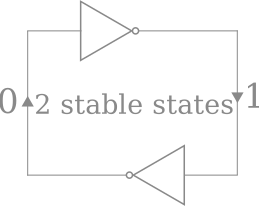
This loop, where the output of one inverter drives the input of the other, creates bistability. The mutual inversion forms a feedback loop that can hold one of two stable states, in the form of low or high voltages:
$$ \begin{align*} Q = 1,\quad &\bar{Q} = 0 \\ Q = 0,\quad &\bar{Q} = 1 \end{align*} $$
This is the foundation of SRAM. These states can be held indefinitely as long as power $V_{dd}$ is available to the cell – SRAM is static.
DRAM#
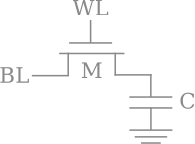
DRAM, in its structure, is much simpler than SRAM. It consists of a single transistor $M$ and capacitor $C$. A DRAM cell keeps its state in $C$. $M$ is used to guard access to the state.
A stored 1 means the capacitor is charged; a 0 means discharged. However, a modern DRAM capacitor is tiny – on the order of 20-40 femtofarads. To store a 1, a charge of $\sim 36 \times 10^{-15} C$ is placed on the capacitor. That’s 36 femtocoulombs, or about 225,000 electrons.
Capacitors discharge or “leak”. Every $\sim 64$ms they have to be refreshed/recharged. This doesn’t stall the whole memory, but it does take up some cycles. To read data on the capacitor also requires discharging it, which takes more cycles. But now the charge on the capacitor is depleted, so every read also is followed by an operation to recharge the capacitor, which takes even more cycles.
DRAM cells, however, are much smaller than SRAM cells. Packing many DRAM cells close together is much simpler, and less expensive. For this reason, caches use SRAM cells, where speed is critical. Main memory uses DRAM cells, where capacity is critical. A typical L1 cache may contain hundreds of thousands of SRAM cells, whereas main memory contains trillions of DRAM cells.
Accessing Memory#
Both SRAM and DRAM cells are arranged in a 2D array. To access a row, the wordline $WL$ is raised. It’s a conductive path shared by all cells in a row.
In SRAM, this opens two access transistors – $M_5$ and $M_6$ that allow the SRAM states to be read or written to via the bitline $BL$.
In DRAM, the raised wordline instead activates the single access transistor $M$ that connects the capacitor $C$ to its bitline.
Reading or writing a bit in either SRAM or DRAM roughly follows these steps:
-
Select a Row (WL)
The cache controller raises a wordline. In SRAM this opens two access transistors. In DRAM this opens a single access transistor. -
Connect to the Bitlines (BL)
Each column of cells shares a bitline. When connected, the cell either slightly raises or slightly lowers the voltage on that bitline depending on whether it stores 0 or 1.In SRAM, this is fast. In DRAM, this takes more time (discharging and charging capacitors).
-
Sense Voltage Differences
The voltage change is incredibly small, only a few millivolts. Nearby sense amplifiers detect which direction (increase or decrease) the voltage change occurred. Then they amplify the difference into a full digital 0V or 1V signal. -
Deliver to the CPU
The sensed bits are combined into a word (for example, 64 bits), and transferred along metal interconnects towards the CPU’s registers. Inside the processor, these signals are now conventional digital values, ready for arithmetic.
The Cache#
The gap between CPU speed and DRAM speed is vast. Modern processors can perform hundreds of arithmetic operations in the time it takes to fetch one value from main memory. To close this gap, CPUs use multiple levels of cache memory built from SRAM.
Caches hold recently used data so that repeated accesses are fast.
$$ \begin{align*} &\text{Level} &&\text{Composition} &&&\text{Access Time} &&&&\text{Typical Size} &&&&&\text{Scope} \\ &\text{L1 Cache} &&\text{SRAM} &&&\sim\text{3 cycles} &&&&\text{32-64KB} &&&&&\text{Per core} \\ &\text{L2 Cache} &&\text{SRAM} &&&\sim\text{10 cycles} &&&&\text{256KB-1MB} &&&&&\text{Per core or cluster} \\ &\text{L3 Cache} &&\text{SRAM} &&&\sim\text{30-60 cycles} &&&&\text{4-64MB} &&&&&\text{Shared among cores} \\ &\text{Main Memory} &&\text{DRAM} &&&\sim\text{200-400 cycles} &&&&\text{GBs} &&&&&\text{System-wide} \end{align*} $$
Each level acts as a local buffer for the one beneath it, ensuring that frequently used data remains as close to the CPU as possible.
When the CPU requests data, it first searches through the caches. If it’s found in L1, that’s an L1 cache hit, and optimal. If it’s not found in L1, it searches through L2, then L3. If it’s not found in L1-L3, it’s a cache miss, and the data must be fetched from main-memory; much slower.
Writing to cache often requires making room. When space is needed, modified lines are written back to L2 on line eviction, which may in turn write to L3, and so on. Each write-back takes clock cycles.
The difficulty in writing a fast BLAS is fitting as much as possible in L1-L2 and minimizing the number of cycles used to move memory around. This is discussed below.
Implementation#
Each cache level (L1, L2, L3) is implemented as a 2D array of cache lines, just like how SRAM and DRAM are organized into rows and columns. However, unlike with DRAM, cache must be able to quickly decide whether a given memory address (that points to requested physical memory) is already stored inside it, and if so, where. This lookup must happen in as few cycles as possible.
Designs#
When the CPU requests a memory address, the cache must check if that address exists in its storage. The address bits of any memory request are divided into three parts that tell the cache exactly where to look and what to verify.
$$ \begin{align*} \text{Address Bits} = [\text{ Tag } | \text{ Set Index } | \text{ Block Offset }] \end{align*} $$
Definition
The Block Offset bits specify the location of the exact byte within a single cache line. Once the correct line is found, these bits identify the requested byte in the line.
Definition
The Set Index bits choose which “set”, or horizontal row of cache lines to check. Each set contains several “ways” (typically 4-16 lines) that can all hold different blocks of memory.Only the lines in this one set are searched; the rest of the cache is ignored.
Definition
The tag bits identify which block of main memory the requested cache line is from. When the CPU looks up an address, the tag from that address is compared to the stored tags of all ways in the chosen set.If a tag matches, it’s a cache hit. If no tag matches, it’s a cache miss.
Hits and Misses#
If a tag matches in L1, then L1 already holds the 64-byte block containing the requested address. The cache uses the Block Offset bits to select the exact bytes needed, and the data is returned to the CPU within $\sim$3 cycles.
If no tag matches, it’s a cache miss. The cache must fetch the entire 64-byte block from the next level of the hierarchy (L2, L3, or DRAM). This process unfolds roughly as follows:
-
Miss detected (1-2 cycles)
The cache controller recognizes the tag is not present and signals a miss -
Next-level lookup ($\sim$10 cycles for L2)
The controller forwards the request to the next cache level. If L2 holds the block, it’s returned and placed in L1. -
Propagated miss ($\sim$30-60 cycles for L3)
If L2 also misses, the request cascades to L3, losing more cycles. -
Main memory access ($\sim$200-400 cycles)
If all cache levels miss, the controller fetches the block from DRAM. This is hundreds of cycles slower than an L1 hit. -
Line replacement ($\sim$1-2 cycles)
Once the data arrives, the cache writes it to an appropriate set. If the set is full, one line is evicted. -
Retry (1 cycle)
The CPU re-attempts the load, which now hits in L1.
The key takeaway is the huge latency difference between L1/L2 hits and misses. It can stall the processor for tens to hundreds of cycles, depending on how deep the request travels down the hierarchy. Mastering this gap – between a few cycles for a hit and hundreds for a miss – is the essence of high-performance BLAS. It’s what makes cache efficiency so critical for CPU performance and writing fast code.
Locality and Contiguity#
I hope I’ve made it very clear that performance depends on how data is arranged in memory. If values that are used together are also stored together, the CPU can reuse cache lines efficiently, producing many hits per fetch.
Two principles govern this:
- Spatial Locality:
data near recently used data is likely to be used soon. - Temporal Locality:
data recently used will likely be used again.
For example, consider a for loop:
let x: Vec<f32> = vec![1.0, 2.0, 3.0, 4.0];
for &val in &x {
    func(&val) // a function call
}
The vector x is a contiguous heap array of 4 f32s, 16 bytes total. Since
each cache line is 64 bytes, all four elements of x reside inside the same
line. Then, when the loop first loads x[0], the entire 64-byte line is fetched
into L1. Then, accesses to x[1], x[2], x[3] will hit in L1 because they’re
in that same cache line – spatial locality.
func() is a function that may be distant from x in memory. But because calls to
func() are close in time, its instructions are loaded in L1 as well (assuming
they fit)–
temporal locality.
Pause Here
The above two paragraphs are the most important to understand in this post. Spatial and temporal locality are the twin principles every high-performance program is built around.
There are two types of L1 caches per CPU core:
- L1d –data cache (for loads/stores like the vector
x)- L1i –instruction cache (for fetched and decoded instructions like
func)
Summary#
- Memory stores data as stable voltage states in physical circuits.
- SRAM retains its state through feedback; DRAM requires refresh.
- Caches made of SRAM bridge the speed gap between DRAM and the CPU.
- Cache lines exist to exploit spatial and temporal locality.
- BLAS leverages these properties by reorganizing data to maximize reuse.
Fast code is not just fast arithmetic. It is the precise choreography of data as it moves from memory to computation and back.
For a deeper understanding, I highly recommend reading through What Every Programmer Should Know About Memory by Ulrich Drepper. This post was abstracted and focused on cache mechanics. Drepper’s paper offers a more in-depth, elegant overview of how memory systems operate.